
If you are trying to bring AI into real business workflows, the hard part usually is not finding a model that can do something impressive in a demo. The hard part is knowing which model to use for which job without lighting your budget on fire.
That sounds obvious, but it is where a lot of teams get tripped up.
Some teams point every task at the most expensive frontier model because they want quality. That works, but it can turn a promising automation into a scary line item. Other teams go the opposite direction: they pick the cheapest model that looks decent in a benchmark, then wonder why the workflow falls apart when the model needs judgment, nuance, or a little bit of business context.
The better answer is model routing.
Use cheap, fast models for repetitive work. Use long-context models when the main job is reading a mountain of material. Use premium models when the work requires judgment, strategy, synthesis, coding, or customer-facing polish. And if you have enough volume, privacy constraints, or customization needs, consider open-weight/self-hosted models — but do that with clear eyes about the operational cost.
This post is a practical guide to that decision. It is written for builders, operators, founders, and corporate teams implementing automation who know they need LLMs but may not yet have a feel for the model landscape.
A quick caveat before we get into the numbers: prices and capabilities change constantly. Treat the pricing here as a May 2026 snapshot, not procurement gospel. Before you commit budget, re-check provider pricing pages and run your own evals on your real tasks.
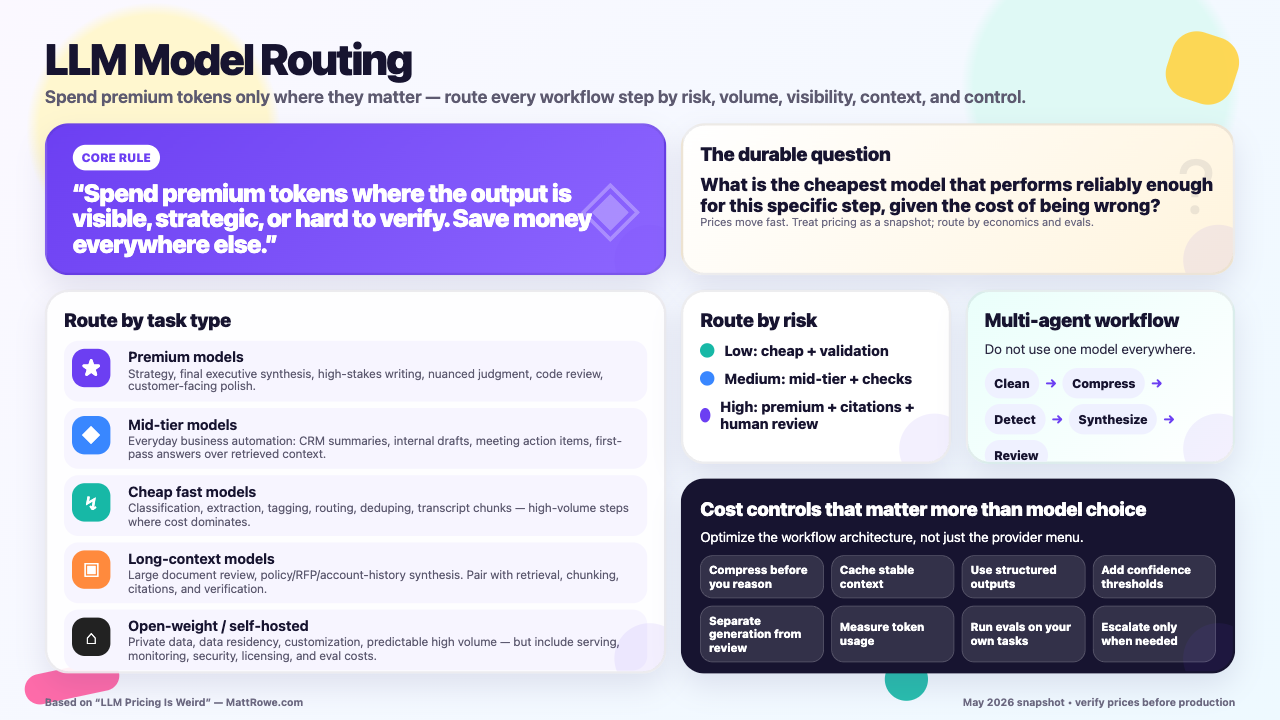
A quick visual guide to the model-routing framework in this post: spend premium tokens where errors are expensive or visible, and use cheaper/faster models for repeatable automation steps.
Quick reference
If you only skim one section, skim this one.
| If your task is... | Usually start with... | Why |
|---|---|---|
| Final executive synthesis, strategy, judgment, high-stakes writing | Claude Opus/Sonnet, GPT frontier, Gemini Pro | You are paying for better reasoning, better writing, and fewer embarrassing errors. |
| Everyday business automation | Claude Haiku, GPT Mini/Nano, Gemini Flash/Flash-Lite, Grok Fast, DeepSeek Flash | Most workflow steps do not need the most expensive model. |
| Long document analysis | Gemini Pro/Flash, Claude Sonnet/Opus, Llama Scout-style long-context models | Context length and retrieval strategy matter more than raw benchmark scores. |
| Coding agents and code review | Claude Sonnet/Opus, GPT Codex/GPT frontier, DeepSeek, Qwen Coder | Code requires precision, iteration, and good tool use. |
| Classification, extraction, tagging, routing | Cheap fast models: Gemini Flash-Lite, GPT Nano/Mini, DeepSeek Flash, Llama/Mistral/Qwen hosted cheaply | These are high-volume steps where cost dominates. |
| Private data, data residency, customization, very high volume | Open-weight/self-hosted Llama, Qwen, Mistral, DeepSeek-family models | Token pricing may matter less than control, privacy, and throughput economics. |
| A workflow with many agents | Mix models by task | Do not use one model everywhere. Route based on risk, complexity, and output visibility. |
The simplest rule of thumb:
Spend premium tokens where the output is visible, strategic, or hard to verify. Save money everywhere else.
Why model pricing feels confusing
LLM pricing looks simple at first: input tokens cost one amount, output tokens cost another. But in real workflows, the cost profile is rarely simple.
A few things make it confusing:
- Output tokens usually cost more than input tokens. Long generated reports, chain-of-thought-style reasoning modes, verbose agents, and repeated retries can get expensive quickly.
- Context size changes the economics. A model with a 1M-token context window can ingest huge documents, but feeding huge prompts is still not free.
- Agent workflows multiply calls. One “task” may actually be 20 model calls: planner, researcher, scraper, classifier, summarizer, verifier, writer, reviewer, and formatter.
- Benchmarks do not equal workflow performance. A cheap model may look great on a chart but fail at your company’s messy CRM notes or weird PDF contracts.
- Provider pricing moves fast. What looked expensive six months ago may be normal now. What looks cheap today may be replaced next quarter.
That is why the decision should not be “which model is best?” It should be:
What is the cheapest model that performs reliably enough for this specific step, given the cost of being wrong?
That last clause matters. If a model misclassifies a low-priority support ticket, the cost is small. If it sends a bad contract summary to a customer or invents a strategic recommendation for an enterprise account, the cost is much higher.
Pricing snapshot: May 2026
The table below uses per-1M-token pricing, input/output, in USD. Where available, I use current provider or routing-market pricing as a practical reference. Some providers have discounts, batch pricing, cached-token pricing, regional pricing, promotional pricing, or enterprise terms. Those details can matter a lot at scale.
| Provider / model | Approx. input / output per 1M tokens | Context window | Practical read |
|---|---|---|---|
| Anthropic Claude Opus 4.7 | $5 / $25 | ~1M | Premium reasoning, writing, and synthesis. Use when quality matters. |
| Anthropic Claude Sonnet 4.6 | $3 / $15 | ~1M | Strong default for serious business automation, coding, and analysis. |
| Anthropic Claude Haiku 4.5 | $1 / $5 | ~200K | Faster/cheaper Claude option for simpler workflow steps. |
| OpenAI GPT-5.5 | $5 / $30 | ~1.05M | Premium general-purpose model with strong ecosystem/tooling story. |
| OpenAI GPT-5.5 Pro | $30 / $180 | ~1.05M | Reserve for very high-value reasoning where cost is secondary. |
| OpenAI GPT-5.4 Mini | $0.75 / $4.50 | ~400K | Useful mid-cost automation model. |
| OpenAI GPT-5.4 Nano | $0.20 / $1.25 | ~400K | Cheap routing, classification, and simple extraction. |
| Google Gemini 2.5 Pro | ~$1.25 / $10, higher at very long prompts in some tiers | ~1M | Excellent long-context economics and document-heavy workflows. |
| Google Gemini 2.5 Flash | ~$0.30 / $2.50 | ~1M | Strong balance for bulk automation, summarization, extraction. |
| Google Gemini 2.5 Flash-Lite | ~$0.10 / $0.40 | ~1M | Very low-cost high-volume tasks. |
| xAI Grok 4.3 | ~$1.25 / $2.50 | ~1M | Attractive output pricing for broad reasoning/synthesis tasks. |
| xAI Grok 4 Fast | ~$0.20 / $0.50 | ~2M | Very inexpensive fast model for bulk workflow steps. |
| xAI Grok Code Fast | ~$0.20 / $1.50 | ~256K | Budget coding-agent option. |
| DeepSeek V4 Pro | ~$0.435 / $0.87 promotional / routed pricing; base pricing may differ | ~1M | Cost-efficient reasoning/coding; good candidate for background agents. |
| DeepSeek V4 Flash | ~$0.14 / $0.28 | ~1M | Very cheap bulk extraction, summarization, and routing. |
| Meta Llama 4 Maverick, hosted | ~$0.15 / $0.60 | ~1M | Open-weight option with attractive hosted economics. |
| Meta Llama 4 Scout, hosted | varies by host; routed examples around ~$0.08 / $0.30 | very large / host-dependent | Long-context open-weight option; especially interesting for private or self-hosted work. |
| Qwen Coder / Qwen large models | varies; often low-cost via hosted routers | 256K–1M depending model | Strong coding and open-model ecosystem option. |
| Mistral Small / Large / Devstral | varies; often inexpensive | 128K–262K+ depending model | Good European/open-model option, especially where licensing and data residency matter. |
The headline is not just that some models are cheaper. It is that some are orders of magnitude cheaper for specific workflow steps.
For example, compare a premium model at $5 input / $25 output to a flash model at $0.10 input / $0.40 output. If you are running millions or billions of tokens through extraction, tagging, and summarization, that difference is not rounding error. It can determine whether the automation is economically viable.
The model matrix
Here is the more useful decision matrix: not just what each model costs, but when you might actually use it.
| Model family | Strengths | Weaknesses | Best use cases | Avoid when |
|---|---|---|---|---|
| Claude Opus / Sonnet | Reasoning, writing quality, coding review, structured synthesis, following nuanced instructions | More expensive than budget models; output can be costly | Executive briefs, final reports, account strategy, code review, high-trust workflows | Bulk extraction, simple classification, low-risk repetitive work |
| Claude Haiku | Claude-style instruction following at lower cost | Less capable on hard reasoning than Sonnet/Opus | First-pass summaries, triage, internal drafts, lightweight automation | Final strategic recommendations or high-stakes outputs |
| OpenAI GPT frontier | Broad reliability, ecosystem, multimodal/tooling integrations, agent platforms | Premium models can be expensive, especially output-heavy workflows | General-purpose automations, tool-using agents, multimodal workflows, polished outputs | Cost-sensitive bulk steps unless using mini/nano variants |
| GPT Mini/Nano | Low-cost general automation, extraction, routing | Less depth and nuance | Classification, field extraction, deduping, quick summaries | Complex reasoning, high-stakes writing, ambiguous tasks |
| Gemini Pro | Long-context analysis, document-heavy work, Google ecosystem | Pricing and behavior can vary by tier/context length | Large document review, research packets, meeting transcript analysis, knowledge-base synthesis | Tiny tasks where a flash model is enough |
| Gemini Flash / Flash-Lite | Excellent economics for high-volume workloads | Less reliable than premium models on nuanced judgment | Bulk summarization, extraction, routing, preprocessing, first-pass analysis | Final customer-facing strategy or subtle reasoning |
| Grok | Competitive price/performance, large-context options, X/search-adjacent ecosystem | Ecosystem and enterprise adoption may vary by org | Research, fast synthesis, coding variants, cost-sensitive analysis | Regulated environments where vendor approval is an issue |
| DeepSeek | Very low cost for reasoning/coding-style tasks | Enterprise risk review, data policy, and consistency should be evaluated carefully | Background agents, code helpers, reasoning at scale, budget-sensitive workflows | Highly regulated or sensitive data without legal/security review |
| Llama / open-weight | Control, privacy, customization, self-hosting, high-volume economics | You own serving, scaling, evals, monitoring, updates, licensing analysis | Private internal automation, predictable high-volume workloads, fine-tuning | Small teams that just need the best model tomorrow morning |
| Qwen / Mistral / other open models | Strong open ecosystem, coding variants, regional/licensing alternatives | Quality varies by model and host | Coding, private workloads, budget inference, experimentation | When frontier reliability is required and model ops maturity is low |
The practical routing framework
Instead of choosing a single “best” model, design your automation around risk and complexity.
1. Use premium models when the task requires judgment
This includes:
- strategic recommendations
- final executive summaries
- nuanced writing
- customer-facing messages
- legal or policy interpretation, with human review
- complex code review
- ambiguous tradeoff analysis
- tasks where the model needs to say “I am not sure” correctly
This is where Claude Opus/Sonnet, GPT frontier models, and Gemini Pro-style models earn their keep. You are not paying for tokens; you are paying for a lower probability of a bad answer at a high-leverage step.
2. Use mid-tier models for everyday work
A lot of business automation lives here:
- summarizing CRM notes
- drafting internal updates
- turning meeting transcripts into action items
- rewriting content for tone
- generating first drafts
- answering questions over retrieved context
Mid-tier models are often the sweet spot. They are good enough to feel smart, but not so expensive that every automation needs a CFO approval meeting.
3. Use cheap fast models for mechanical steps
This is where many teams overspend.
Do not use a premium reasoning model to answer questions like:
- Is this email about support, sales, billing, or legal?
- Extract company name, role, date, contract value, and renewal term.
- Deduplicate these contacts.
- Turn this transcript chunk into five bullet points.
- Decide which downstream agent should handle this task.
These steps can usually be handled by cheap fast models, especially if you use structured outputs and validate the result.
4. Use long-context models when reading is the job
If the primary difficulty is that there is a lot of material — 300 pages of policy, years of support tickets, an RFP packet, a giant customer account history — context length becomes strategically important.
But be careful: long context is not magic. A model can accept a million tokens and still miss the one sentence that matters. For high-value workflows, combine long context with retrieval, chunking, citations, and verification.
Use long-context models when:
- the relevant evidence may appear anywhere
- you need broad synthesis across many documents
- splitting documents would lose important relationships
- the cost of retrieval misses is high
Use retrieval instead when:
- the corpus is stable
- queries are narrow
- you can index the content well
- you need repeatable citations
5. Use open-weight or self-hosted models when control matters
Open-weight models are not merely “cheap models.” They are a different operating model.
With hosted APIs, you pay per token and outsource serving. With self-hosting, you may reduce or eliminate per-token API fees, but you take on hardware, electricity, orchestration, scaling, monitoring, uptime, model updates, quantization, security, and evals.
Self-hosting can make sense when:
- you have very high token volume
- workloads are predictable enough to keep GPUs utilized
- data residency or privacy requirements block third-party APIs
- you need domain-specific fine-tuning
- latency requirements favor local inference
- you already have platform/ML engineering capacity
It probably does not make sense when:
- usage is small or spiky
- your team does not want to run inference infrastructure
- you need the latest frontier capability immediately
- the workflow changes every week
- the model quality gap would cost more than the token savings
A good corporate posture is: start with APIs, measure real usage, then consider self-hosting once volume, privacy, or customization justifies the complexity.
Example workflow: sales/account intelligence agents
Let’s make this concrete.
Imagine you are building an AI sales intelligence workflow for enterprise account teams. The goal is to turn scattered information into a useful account brief before a sales call.
The system might pull from:
- CRM notes
- prior emails
- support tickets
- product usage data
- company website
- recent news
- SEC filings or investor materials
- LinkedIn-style profile data
- call transcripts
- previous proposals
- competitive intelligence
The business value is obvious: reps spend less time researching and more time having relevant conversations. Managers get more consistent account planning. Customers get outreach that actually reflects their situation.
But if you use a premium model for every step, this workflow can get expensive fast. A better architecture uses multiple agents, each routed to the right model tier.
Agent 1: Data collection and normalization
Job: Gather raw material and convert it into clean structured records.
Examples:
- company name
- industry
- employee count
- revenue band
- recent news headlines
- known contacts
- open opportunities
- current products used
- renewal date
- support sentiment
Recommended model tier: cheap fast model or small open model.
Why: This is mostly extraction and formatting. Use structured JSON schemas, validation, and retries. You do not need a premium model unless the source material is extremely messy.
Good candidates: Gemini Flash-Lite, GPT Nano/Mini, DeepSeek Flash, Grok Fast, hosted Llama/Mistral/Qwen.
Agent 2: Source summarization
Job: Summarize each source into compact notes.
- “Summarize the last 12 months of support tickets.”
- “Summarize this earnings call section for business priorities.”
- “Summarize the CRM history for this account.”
Recommended model tier: cheap or mid-tier model, depending on source complexity.
Why: Summarization is high-volume. Use lower-cost models for first-pass summaries, then pass only the compressed signal forward.
Good candidates: Gemini Flash, Claude Haiku, GPT Mini, Grok Fast, DeepSeek Flash.
Agent 3: Signal detection
Job: Identify buying signals, risk signals, and account triggers.
Examples:
- new executive hire
- expansion into a new market
- cost-cutting language in earnings materials
- competitor mentioned in support tickets
- product adoption spike
- renewal risk
- unresolved support issues
Recommended model tier: mid-tier model, with escalation.
Why: This requires some judgment, but not always premium judgment. Use a mid-tier model first. Escalate to a stronger model when signals conflict or confidence is low.
Good candidates: Claude Haiku/Sonnet depending risk, GPT Mini/frontier depending complexity, Gemini Flash/Pro, DeepSeek Pro.
Agent 4: Account strategy synthesis
Job: Turn the signals into an account point of view.
This is where the brief becomes useful:
- What is likely top of mind for this company?
- What business problems might they care about?
- Where do we have credibility?
- What should the rep avoid saying?
- What are the best discovery questions?
- What is the account risk?
- What is the recommended next step?
Recommended model tier: premium model.
Why: This is a judgment step. Bad synthesis can mislead the team. This is where Claude Sonnet/Opus, GPT frontier, or Gemini Pro makes sense.
Do not cheap out here. You have already saved money by compressing the raw research with cheaper agents. Spend the premium tokens on the step that matters.
Agent 5: Message drafting
Job: Draft a customer-facing email, call prep note, or executive briefing.
Recommended model tier: premium or strong mid-tier, depending visibility.
If the output goes directly to a customer or executive, use a stronger model and a review step. If it is an internal first draft, use a mid-tier model.
Good candidates: Claude Sonnet/Opus for writing quality, GPT frontier for ecosystem/tooling, Gemini Pro for long-context grounding.
Agent 6: Critic/reviewer
Job: Check the brief before it reaches a human.
The critic should ask:
- Are claims supported by evidence?
- Did we confuse facts with guesses?
- Are there obvious hallucinations?
- Is the tone appropriate?
- Did we miss known account risks?
- Are recommendations specific enough?
Recommended model tier: strong model, often different from the writer.
Why: Reviewer diversity helps. If Claude wrote the account strategy, have GPT or Gemini critique it. If GPT wrote it, have Claude review it. For lower-risk workflows, a cheaper critic can still catch formatting and citation problems.
What this workflow optimizes
This architecture gives you quality where it matters and savings where quality is easier to verify.
A bad version of the workflow does this:
Premium model reads everything, summarizes everything, reasons about everything, writes everything, and reviews itself.
A better version does this:
Cheap models clean and compress the data. Mid-tier models detect signals. Premium models synthesize strategy and final messaging. A separate reviewer model checks the output.
That is how you get high-quality results without paying premium prices for every token.
A durable way to choose models
Because the model landscape changes so quickly, I would avoid hard-coding a permanent “default stack.” The right answer today may be stale in three months.
Instead, use a routing policy.
Route by task type
- Extract / classify / tag: cheapest reliable structured-output model
- Summarize: cheap or mid-tier model, depending complexity
- Research: long-context or retrieval-augmented model
- Reason: premium or specialized reasoning model
- Write final output: premium model if visible/high-stakes
- Review: strong model, preferably different from the writer
- Code: coding-specialized model or frontier model with good tool use
Route by risk
Ask: what happens if the model is wrong?
- Low risk: use cheap models, validation, and sampling
- Medium risk: use mid-tier models plus confidence checks
- High risk: use premium models, citations, human review, and audit logs
Route by volume
Ask: how often will this step run?
- Rare and important: premium is fine
- Frequent and simple: optimize aggressively
- Frequent and complex: consider caching, batching, distillation, fine-tuning, or self-hosting
Route by visibility
Ask: who sees the output?
- Internal intermediate output: cheap is fine
- Internal decision support: mid-tier or premium depending stakes
- Customer-facing output: premium plus review
- Regulated/legal/financial output: premium plus human approval
Cost controls that matter more than model choice
Model choice is important, but it is not the only lever.
1. Compress before you reason
Do not send 500 pages to a premium model if a cheap model can extract the 20 relevant facts first.
2. Cache stable context
Policies, product docs, account profiles, and knowledge-base entries often change slowly. Use caching or retrieval instead of repeatedly paying to resend the same text.
3. Use structured outputs
JSON schemas reduce retries, make validation easier, and let cheaper models succeed more often.
4. Add confidence thresholds
If a cheap model is confident and passes validation, continue. If not, escalate.
5. Separate generation from review
A reviewer model can catch unsupported claims, formatting errors, and weak reasoning. This is especially useful for agent workflows.
6. Measure actual token usage
Do not estimate from vibes. Log input tokens, output tokens, retries, latency, and user satisfaction by workflow step.
7. Run evals on your own tasks
The best benchmark is your messy data. Build a small eval set of real examples, expected outputs, and failure cases. Re-run it whenever you change models.
Where self-hosted models fit
The self-hosting conversation usually starts with cost, but cost is only part of it.
Self-hosted/open-weight models can be compelling when you need:
- privacy and data control
- predictable high-volume inference
- custom fine-tuning
- lower latency inside your own network
- domain adaptation
- independence from a single API vendor
- regional or regulatory control
The open model ecosystem is also getting much stronger. Llama, Qwen, Mistral, DeepSeek-family models, and specialized coding models are good enough for many internal automation steps. In some cases, they are not just “good enough” — they are the right tool because you can control them.
But self-hosting has real costs:
- GPU capacity planning
- serving infrastructure
- autoscaling or queueing
- monitoring and observability
- model upgrades
- security patching
- evals and regression testing
- prompt/model compatibility changes
- licensing review
The break-even point depends on utilization. A GPU sitting idle is expensive. A GPU running predictable high-volume workloads can be very efficient.
My practical advice: do not start with self-hosting just because it sounds cheaper. Start by measuring API usage. If you are pushing serious volume through stable, repeatable workflows — or if privacy/regulatory requirements demand it — then evaluate self-hosting with real numbers.
Also, pay attention to licenses. “Open weights” does not always mean “do whatever you want.” Some models use permissive Apache/MIT-style licenses. Others, including Llama-family models, have community licenses with commercial restrictions. That may be totally fine for your use case, but it is not something to discover after rollout.
So which model should you use?
Here is the short version:
- If the task is strategic, ambiguous, or visible, use a premium model.
- If the task is routine and easy to validate, use a cheap model.
- If the task is reading a huge amount of context, use a long-context model or retrieval.
- If the task is private, high-volume, or customized, evaluate open-weight/self-hosted models.
- If the workflow has multiple agents, route each agent separately.
The biggest mistake is treating model selection like a one-time vendor decision. It is not. It is an architecture decision.
The best AI systems will not be built around one model. They will be built around routing, evals, observability, and thoughtful escalation.
That is less exciting than saying “Model X is the best.” But it is much more useful.
Final thought
LLM pricing is weird because LLM work is weird. A “task” might be one short answer or a chain of 40 hidden steps. A cheap model might be perfect for 80% of the workflow and disastrous for the final 20%. A premium model might be too expensive for bulk processing but incredibly cheap compared to one bad executive recommendation.
So do not ask, “Which model should we use?”
Ask:
What parts of this workflow need intelligence, what parts need speed, what parts need context, and what parts need judgment?
Once you answer that, the pricing starts to make a lot more sense.
Sources and pricing references
Pricing and model details were checked in early May 2026. Always verify current prices before procurement or production rollout.
- Anthropic Claude pricing: https://platform.claude.com/docs/en/about-claude/pricing
- OpenAI API pricing: https://openai.com/api/pricing/
- Google Gemini API pricing: https://ai.google.dev/gemini-api/docs/pricing
- xAI models and pricing: https://docs.x.ai/docs/models
- DeepSeek API pricing: https://api-docs.deepseek.com/quick_start/pricing
- OpenRouter model pricing API: https://openrouter.ai/api/v1/models
- DeepInfra hosted model pricing, including Llama-family examples: https://deepinfra.com/pricing
- Meta Llama models and license information: https://www.llama.com/
- Mistral AI model documentation/pricing: https://docs.mistral.ai/ and https://mistral.ai/products/la-plateforme